
Which card is best for Amazon and Flipkart? The honest answer is: it changes
Every "best card" list gives you one name. The problem is that the card which saves you the most on a phone this week may save you nothing on a washing machine next week — with the same two cards in your wallet. Here's what actually decides it, and how to pick correctly every time.
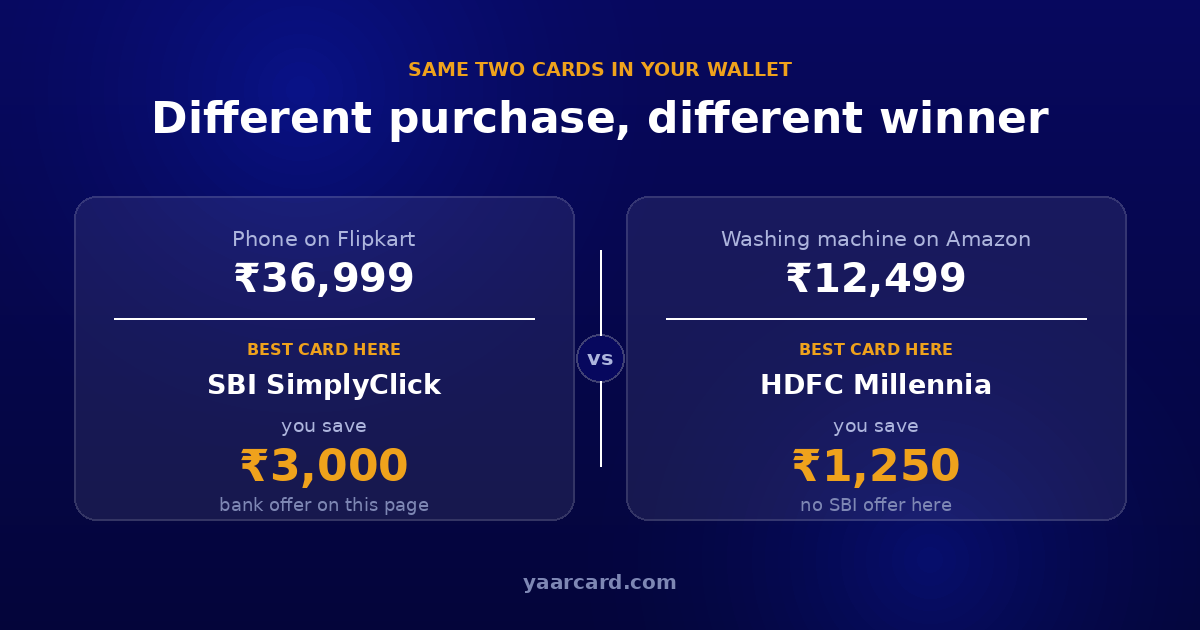
The same two cards. Two purchases. Two different winners.
The short answer
There is no single best credit card for Amazon and Flipkart, and anyone who gives you one name without asking what you're buying is guessing.
That isn't a dodge. It's because the largest part of your saving on these sites doesn't come from the card at all — it comes from the bank offer attached to that specific product page, and those offers rotate constantly.
Three things decide it on any given purchase
In roughly this order of impact:
1. The bank offer printed on that page
This is almost always the biggest number, and the one that changes most. A ₹3,000 instant discount for one bank dwarfs the 1–5% most cards earn in rewards. But it applies only to the bank named in the offer, only above a minimum purchase, and only up to a cap.
Offers also change between sales, between categories, and sometimes between two listings of the same product by different sellers. This is the single reason no fixed answer can exist.
2. Whether you hold a co-branded card for that site
Co-branded cards — the ones carrying both a bank's name and a shop's — usually give their highest reward rate on that shop, and some offers are reserved for them entirely. If you shop mostly on one site, this matters.
But it cuts both ways: a co-branded card's offer works only on that exact card. A "Flipkart SBI" offer does nothing for a regular SBI card, which is the most common mistake people make during a sale.
3. Your card's own reward rate
This is the smallest and most stable factor. It's worth knowing, but if you pick your card on reward rate alone while ignoring the offer on the page, you'll usually lose more than you gain.
Why "best card" lists go stale so fast
Card fees, reward rates, category caps and partner tie-ups get revised regularly, and sale offers change week to week. An article naming the single best card is accurate on the day it's published and drifts from then on.
That's why this page gives you a method instead of a name. The method still works next year.
A real example of the flip
Say you hold two cards — one SBI, one HDFC.
On a phone listed on Flipkart, the page carries a bank offer for SBI cards. Your SBI card takes a few thousand rupees off instantly. Your HDFC card earns only its usual reward rate. SBI wins, and it isn't close.
On a washing machine on Amazon the following week, there is no SBI offer at all. Now the HDFC card's reward rate is the only thing earning anything, so it wins by default.
Nothing about either card changed. Only the page did.
This is the whole point: the best card is a property of the purchase, not of your wallet.
How to pick the right card in 60 seconds
- Read the bank offers on the product page first. Not the card — the page. This is where the big number lives.
- Check whether any of them names a bank you hold. Match the card's full name, not just the bank's.
- Check the minimum purchase and the cap. "10% off up to ₹1,500" on a ₹40,000 item is ₹1,500, not ₹4,000.
- Confirm it isn't an EMI-only offer if you're paying in full. The two are separate and the EMI number is usually the bigger one.
- If no offer matches, fall back to reward rate. Use whichever of your cards earns most in that category.
- Check the final amount at checkout. That's the only place anything is confirmed.
Which kinds of cards are actually worth holding
Without naming a winner — because that changes — these are the categories that tend to help on Amazon and Flipkart:
- A co-branded card for whichever site you use most. If 80% of your orders are on one site, this is usually the highest-value single card to hold.
- A general online-shopping card from a different bank. The point of the second card isn't rewards — it's that bank offers rotate between banks, and holding two means you qualify more often.
- A card from a bank that appears often in sale offers. During big sales, a handful of banks show up repeatedly. Which ones varies by sale, so watch a couple of sales before deciding.
Two cards from two different banks covers most situations. A third rarely adds much, and every card carries its own fee and discipline cost.
Three mistakes that cost the most
- Picking by reward rate and ignoring the page offer. The offer is usually 10–50x larger than the rewards.
- Assuming the bank name is enough. Co-branded and corporate cards are frequently excluded, and offers name the exact card.
- Taking a card only for one sale. A new card for a single discount, with an annual fee attached, rarely pays for itself.
Did everything right and the discount still didn't apply? Seven common reasons for that here.
Where YaarCard fits
Everything above is a checklist you'd have to run on every product page, every time. That's exactly the part worth automating.
YaarCard is a free Chrome extension that does those six steps for you. You add the cards you actually own, once — just the bank and the card type, never a card number. After that, on any Amazon.in or Flipkart product page it reads the bank offers printed there, works out the real saving for each of your cards including caps and minimum purchase, and tells you which one wins on that page.
It keeps EMI-only offers on a separate line so they never inflate the headline number, and it knows a co-branded card's offer doesn't transfer to a regular card. It also shows what the other banks on that page are offering, so you can see what you're missing.
It makes no network requests at all. Nothing about your cards or your browsing leaves your browser.
Stop running the checklist by hand
Add your cards once. YaarCard reads every Amazon.in and Flipkart product page you open and tells you which of your own cards saves the most, and by how much. It's free, and it never asks for a card number.
Add YaarCard to ChromeThis article explains how to compare offers; it is not financial advice and not a recommendation to apply for any particular card. Card fees, reward rates and bank offers change regularly — check the current terms with the bank before you decide anything. YaarCard is an independent project and is not affiliated with Amazon, Flipkart or any bank.